Put it last.
Load SCAT Sauce on your master bus. Play the fullest, loudest section of your track.
SCAT SOUNDS / FL STUDIO + ABLETON / WINDOWS VST3
Your sound. Your finish.
Press Listen. Sauce analyzes your mix and sets a mastering starting point automatically.
Then adjust the controls to your taste.
There’s a point where a mix starts to feel like a record.
SCAT Sauce listens to your mix, shapes a finishing chain, and gives you the controls to make it yours. From the first listen to the last adjustment.
Play your track and press Listen. Sauce analyzes 15 or 30 seconds, then automatically sets a mastering starting point for your mix.
15 OR 30 SECONDS. YOUR STARTING POINT.Scroll to shape the story
A CLOSER LOOK.
Shape the tone. Open the space. Bring the mix forward.
Make the changes you can hear.
TONE & EQUALIZER
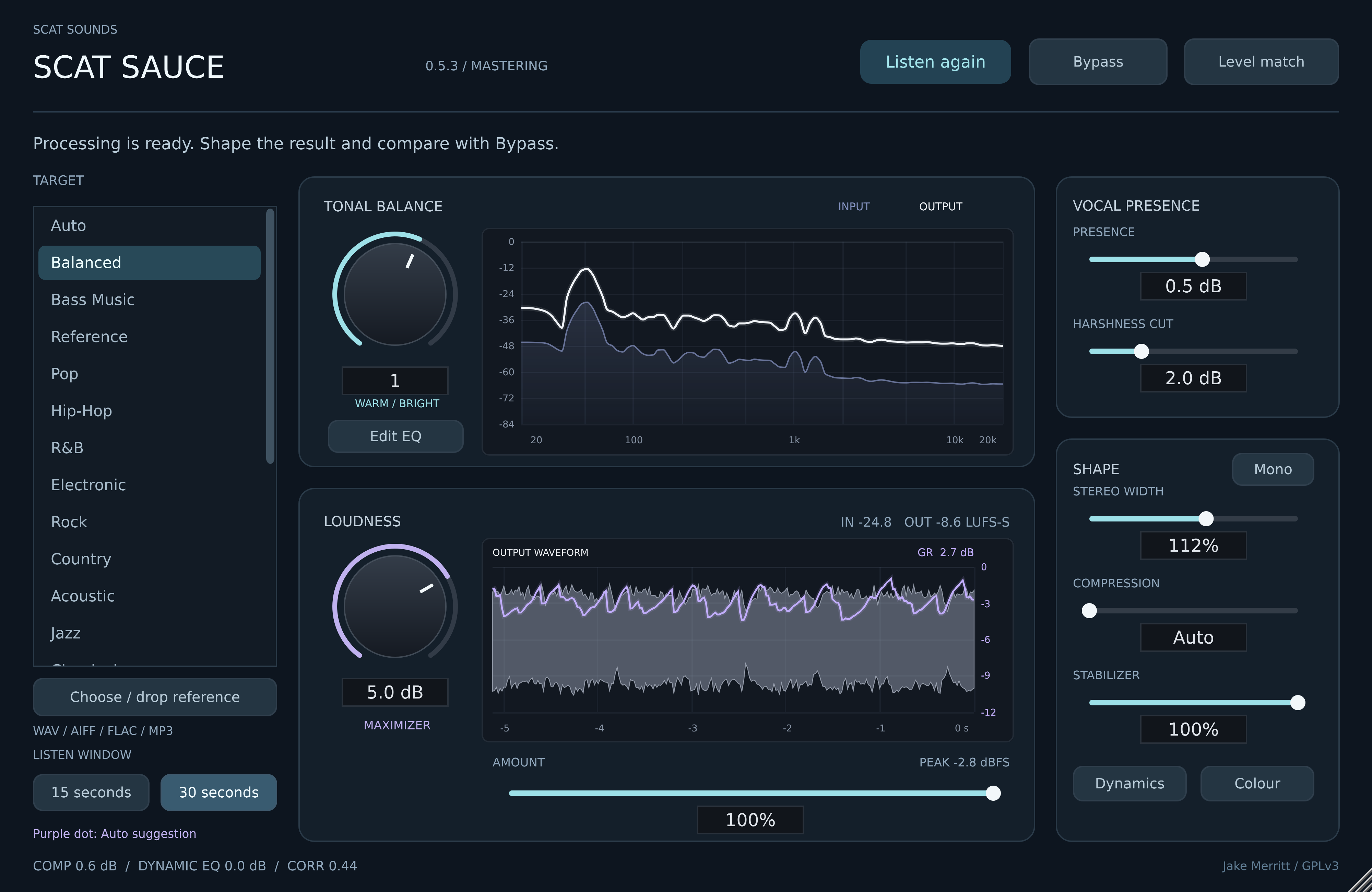
Start warm or bright. Open the EQ for direct control over six bands, or bring a reference and let Listen measure a starting point.
The actual SCAT Sauce interface. Select a module to take a closer look.
LISTEN TO THE DIFFERENCE.
Same section. Original and finished.
Switch between them. Match loudness if you want.
Lowers only the processed playback to match the original’s loudness. Turn it off to hear the actual rendered level.
Original and plugin render at their own levels. Hear the loudness, tone, punch, and width changes.
While this player is focused: Space play / pause A Original B SCAT Sauce ←→ seek
Press Play below. Original / SCAT Sauce and seeking above also control these players. Use your device’s volume buttons on iPhone.
LUFS · ORIGINAL
LUFS · FULL-LEVEL RENDER
THE SAME EXCERPT
This existing comparison was rendered through SCAT Sauce v0.5.1 VST3 at 100% Amount, 85% Equalizer, 65% Stabilizer, 85% Width Match, 100% Dynamics, and +2 dB Maximizer. When Match loudness is on, the processed sample is turned down by 4.83 dB with a fixed gain adjustment. With matching on, both play at approximately −17 LUFS; no extra compression is added for matching. With matching off, processed playback and the full-level download remain at -12.2 LUFS with an independent peak estimate of approximately -1.35 dBTP. Measurements describe this 30-second sample; your result depends on your mix and settings.
FROM YOUR MIX. TO YOUR FINISH.
Load SCAT Sauce on your master bus. Play the fullest, loudest section of your track.
Press Listen. Sauce analyzes 15 or 30 seconds of your mix and automatically sets the starting tone, dynamics, stereo width and loudness.
The starting point is already set. Turn the controls to your taste, adjust Amount, and compare with the original.
Choose or drop a WAV, AIFF, FLAC, or MP3 into the plugin. See the filename and loading result, then play your mix and press Listen.
IN YOUR STUDIO
One Windows x64 VST3 installer for FL Studio and Ableton Live. Choose your setup and get straight to the steps.
Mac AU for Logic and Mac VST3 are in preparation. They’re included with the same purchase when available.
SCAT SAUCE / YOUR NEXT SESSION
Sauce analyzes your mix and sets a mastering starting point automatically. Adjust the controls to make the finish yours.
One purchase. No subscription. Updates included.
Sale ends October 31, 11:59 p.m. ET. SCATFALL39 is applied at checkout.
Get SCAT SauceSecure payment through Stripe
Windows x64 · VST3 · v0.5.3 beta
Unsigned installer. FL Studio loading confirmed; Ableton host testing is ongoing. Mac AU/VST3 is in preparation.
Check your setupPaid digital download. Read the purchase policy before checkout.
Your installer and purchase details, available in your account.
Listen, tone, six-band EQ, dynamics, stereo width and maximizer controls.
SCAT Sauce updates and future Mac formats are included with the same purchase.
THE DETAILS.
Close your DAW and run the Windows installer. FL Studio: open Options → Manage plugins, enable Verify plugins and Rescan previously verified plugins, then Find installed plugins. Ableton Live: open Settings/Preferences → Plug-Ins, enable Use VST3 Plug-In System Folders, then Rescan. Load SCAT Sauce on your Master track. The same Windows installer serves both DAWs. Replace any old instance so the updated plugin loads.
Yes. Play your track and press Listen. Sauce analyzes the audio, sets a mastering starting point automatically, and checks the processed result. You can then adjust tone, EQ, dynamics, stereo width, loudness and Amount to your taste. The learned settings work beneath the manual controls, so every visible knob does not need to move. You stay in control of the finish.
The plugin includes 18 genre targets, including EDM, Dubstep, Future Bass, House, Pop, Hip-Hop, Rock, and more. Choose a tonal starting point and adjust by ear. Auto suggests a tonal starting point; it is not a reliable genre classifier. After Listen, changing targets recalculates your captured section.
The current Windows x64 VST3 plugin, its installer, and the corresponding GPLv3 source. Sign in before checkout. After Stripe confirms payment, your owning account provides the installer. Future SCAT Sauce updates are included. Download the latest installer from your account or your purchase confirmation page. There is no subscription. Contact support ↗ if you need a hand.
SCAT Sauce is an independent mastering plugin. Core audio and native VST3 checks passed. Loading has been confirmed in FL Studio on Windows. Listening tests and broader compatibility testing are ongoing. Use the sample, compare on your own mix, and send feedback to scatsounds@gmail.com.
SCAT Sounds is Jake Merritt’s audio-plugin project and the home of SCAT Sauce. SCAT Sauce carries his attribution and is distributed under GPLv3 with corresponding source included. Third-party components retain their original notices. Ownership and license ↗